Fix the PDFs on your site. Prove each one.
Ockem Proof finds the PDFs you publish, fixes most accessibility problems automatically, and walks your team through the few judgment calls left. Every finished document gets a certificate anyone can verify.
Free · no account · a verified email · one document per email · up to 10 pages · 50 MB
- 42
- automated fixers, each re-checked after it runs
- 1–2
- decisions per document left for a person: one at the median, two at the 90th percentile (production documents, Aug 2026)
- veraPDF
- the open-source PDF/UA validator Proof builds on, plus Ockem’s own detectors for what it can’t check
- Public
- every certificate has a verification page anyone can open from its QR code
The calls left for you
Software fixes the rest. You decide on the page.
No tag tree. You see each problem where it is on the page, make the call, and Proof checks the result again.
Draw the reading order
Run a pen down each column. Proof numbers each block as the pen reaches it.
Mark the table headers
Lay a grid over the table, then tick the header row and the header column.
Pick a color that passes
Proof suggests a darker shade of your own color. One swap took this box from 1.7:1 to 5.6:1.
Approve the alt text
AI drafts a description beside the picture. You read it, then keep it or rewrite it.
The payoff
Every finished document gets a certificate. Anyone can check it.
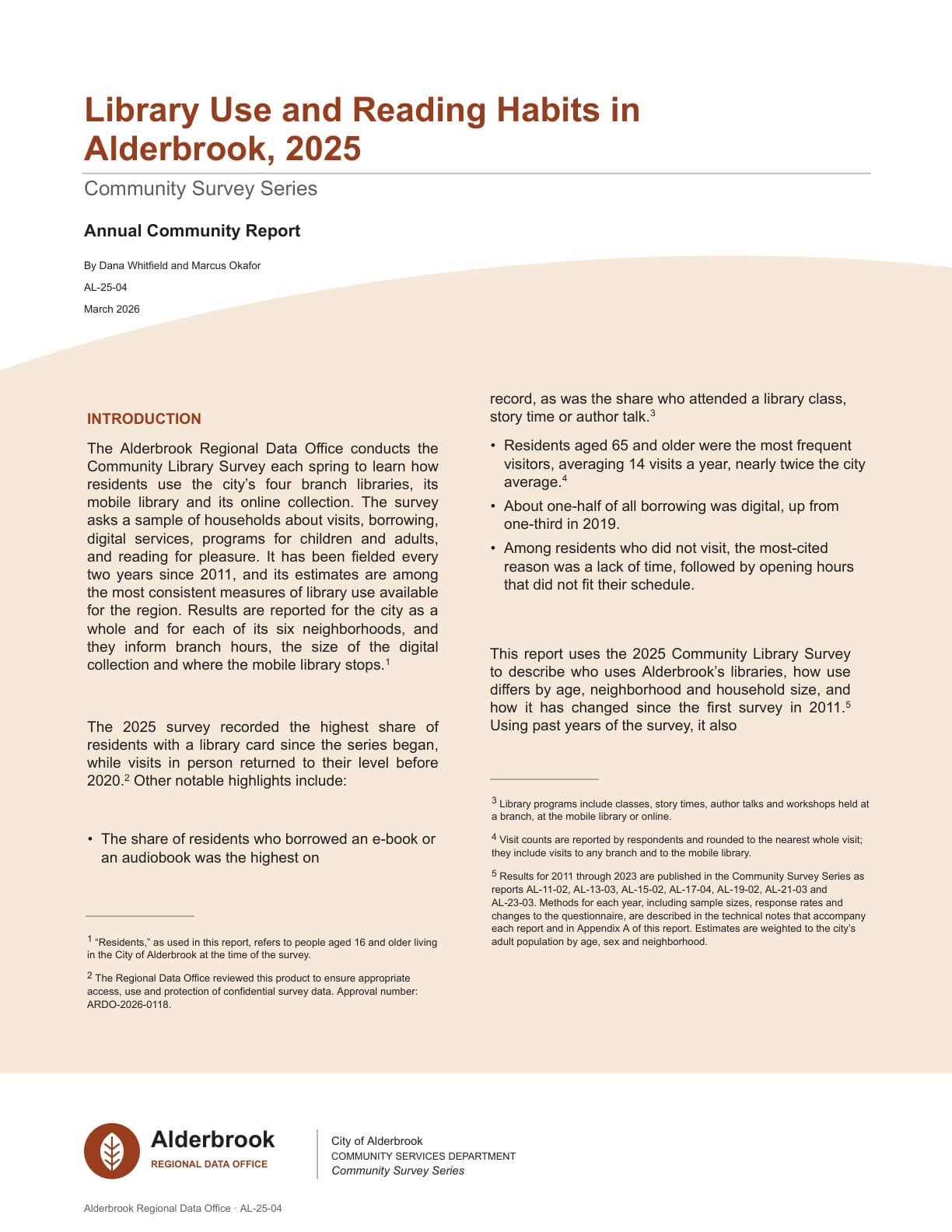
One page, built to be read in a minute by someone who wasn’t in the room: what was checked, who confirmed the rest, and what the certificate does not claim.
- One number: open issues. Zero means every applicable check passed or was attested. Anything above zero and the document is not certified.
- What software verified. 35 automated checks against this exact file. The only part of the certificate Ockem asserts from its own testing.
- What a person confirmed. Reading order, use of color and non-text contrast, attested by the City of Alderbrook under the attestation statement its attester accepted.
- Every rule, shown. Each check with how it was resolved: passed as delivered, fixed by Proof, or attested. Nothing that applies is left off.
- Anyone can check it. The QR code opens a public page that confirms the certificate is genuine and names the exact file version.
Sample from our demo library, issued October 12, 2026. The document is a U.S. Census Bureau report (public domain); the certificate holder is a demo city. Compare the original: 5 open issues as it arrived.
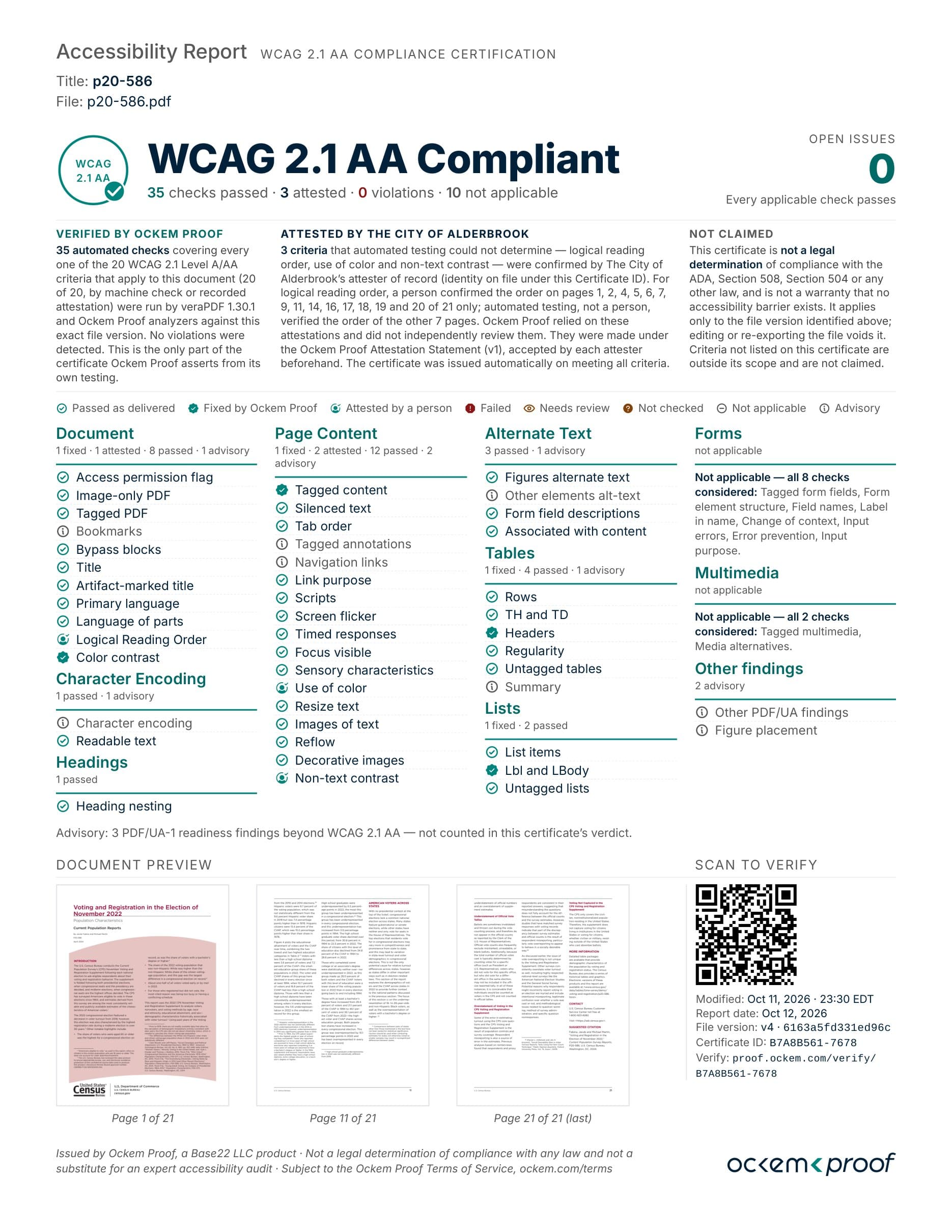
Text version of this certificate
Accessibility Report, WCAG 2.1 AA compliance certification. Title: p20-586. File: p20-586.pdf. WCAG 2.1 AA Compliant: 35 checks passed, 3 attested, 0 violations, 10 not applicable. Open issues: 0. Every applicable check passes.
Verified by Ockem Proof: 35 automated checks covering every one of the 20 WCAG 2.1 Level A/AA criteria that apply to this document (20 of 20), by machine check or recorded attestation, run by veraPDF 1.30.1 and Ockem Proof analyzers against this exact file version. No violations were detected.
Attested by the City of Alderbrook: 3 criteria that automated testing could not determine (logical reading order, use of color and non-text contrast) were confirmed by the city’s attester of record. For logical reading order, a person confirmed the order on pages 1, 2, 4, 5, 6, 7, 9, 11, 14, 16, 17, 18, 19 and 20 of 21 only; automated testing, not a person, verified the order of the other 7 pages. Ockem Proof relied on these attestations and did not independently review them.
Not claimed: this certificate is not a legal determination of compliance with the ADA, Section 508, Section 504 or any other law, and is not a warranty that no accessibility barrier exists. It applies only to the file version identified; editing or re-exporting the file voids it.
Rules: Document, Character Encoding, Headings, Page Content, Alternate Text, Tables and Lists, each rule with its outcome. Forms (8 checks) and Multimedia (2 checks) are not applicable and each rule considered is named. Advisory: 3 PDF/UA-1 readiness findings beyond WCAG 2.1 AA, not counted in the verdict.
Record: modified Oct 11, 2026; report date Oct 12, 2026; file version v4, fingerprint 6163a5fd331ed96c; certificate ID B7A8B561-7678; verify at proof.ockem.com/verify/B7A8B561-7678.
Why it matters
Every PDF on your site is for someone.
An accessible document is one a person can use on their own, the first time, with whatever tools they rely on.
- A parent filling in a school asthma plan with a screen reader, field by field.
- A resident enlarging a public notice to read it, with the text still in order.
- An applicant moving through a permit form with a keyboard, in the order it was meant to be read.
Pricing
One flat price per document. Never per page.
Importing and auditing are free. You pay when a document is certified, so a document that never certifies never costs anything.
A document is one PDF of up to 50 pages; a 120-page PDF counts as three. Prepaid documents never expire. Most documents need one manual check from your team, two at the 90th percentile (production documents, Aug 2026). Want Ockem to make those calls? Ask about Assured. See full pricing
Your documents are private — never sold, never shared with other customers, and not used for model training unless your workspace turns that on. Inference runs on hardware we operate; no customer document content goes to a third-party model.
Track record
Built by people who’ve done this at state scale.
Ockem is built by Base22, a digital experience studio founded in 2007 that works with public institutions and enterprises.
In May 2026 Base22 remediated more than 600 of the New Mexico Department of Health’s public documents in one month, from over 2,000 WCAG 2.1 AA issues to zero. Proof wasn’t ready for the whole project, but its early checks and fixers carried the mechanical work. People made every judgment call, and every decision was recorded.
2,000+ to 0WCAG 2.1 AA issues across the set
- 600+
- public health documents remediated
- 1 month
- May 2026, against a commitment of 300
Asthma action plans for schools, water analysis requests, clinic forms with more than 150 fields, and mpox fact sheets in English, Spanish and Diné.
All were public documents. Proof is not offered for documents that contain protected health information or FERPA-protected student records; see Security and procurement.
Read the case study on base22.com (opens an external site)Deadlines
Title II applies April 26, 2027. Start with the documents people use.
PDFs posted before your date are exempt unless people still use them to apply for, access or take part in a service. Those come first. The rest can follow a plan.
State and local governments serving 50,000 people or more
Smaller governments and special districts
Recipients of HHS funding with 15 or more employees
Recipients with fewer than 15 employees
Dates as of October 2026, set by interim final rules in April and May 2026. A lawsuit filed in May (NFB v. DOJ and HHS) asks a court to restore the original 2026 dates. We update these dates when the court rules. Not legal advice. Proof is not offered for documents that contain protected health information or FERPA-protected student records; see Security and procurement.
What counts, and what’s exemptGuides
Plain answers for the people doing the work.
What the rules require, what fixing costs, and how to prove it’s done. All guides
ADA Title II PDF requirements: what's exempt and what changed in 2026
The April 2026 rule moved the deadlines by a year and left the requirements alone. Here is what your PDFs must meet, which ones are exempt, and how to size and plan the work.
Accessible PDF forms: how to make a fillable form screen readers can use
Forms are how residents apply for permits, licenses and services, so they are the PDFs most worth fixing first. Here is what each field needs, how to set it in Acrobat Pro, and how to test it with a free screen reader.
Alt text for complex images: charts, maps and diagrams in PDFs, and where AI helps
A short alt names the picture and its point. A long description carries what it shows. Full examples for a budget chart, two kinds of map, an org chart, a flowchart and an infographic, plus what AI drafting gets right and wrong.
Start with one PDF.
Free, no account: a verified email, one document per email, up to 10 pages and 50 MB. Get the remediated file and its verification record, and see which checks still need a person.
Longer document? Request an assessment.