How it works
From a website full of PDFs to a library you can prove.
Six stages, the same for ten documents or ten thousand. At each one: what Proof does, what your team does, and what you have at the end.
01
Find
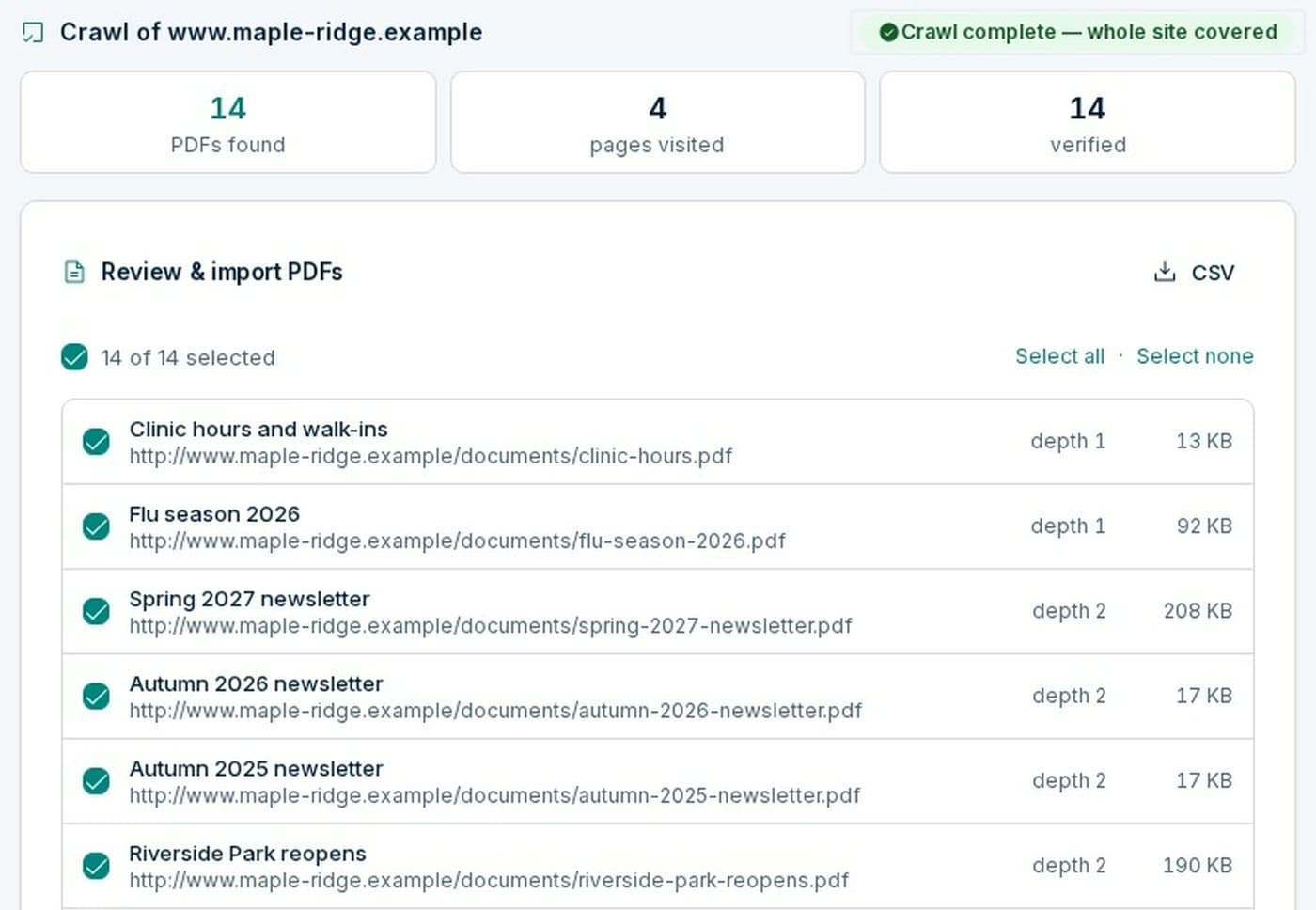
Point Proof at your website. It finds every PDF you publish.
- Proof
- Crawls your domain, respecting robots.txt and picking up where it stopped, lists every linked PDF and derives folders from your site’s URL structure.
- Your team
- Approve the folder tree, then import everything or a sample.
- You end up with
- An inventory: every PDF, where it is published, in folders you recognize.
02
Measure
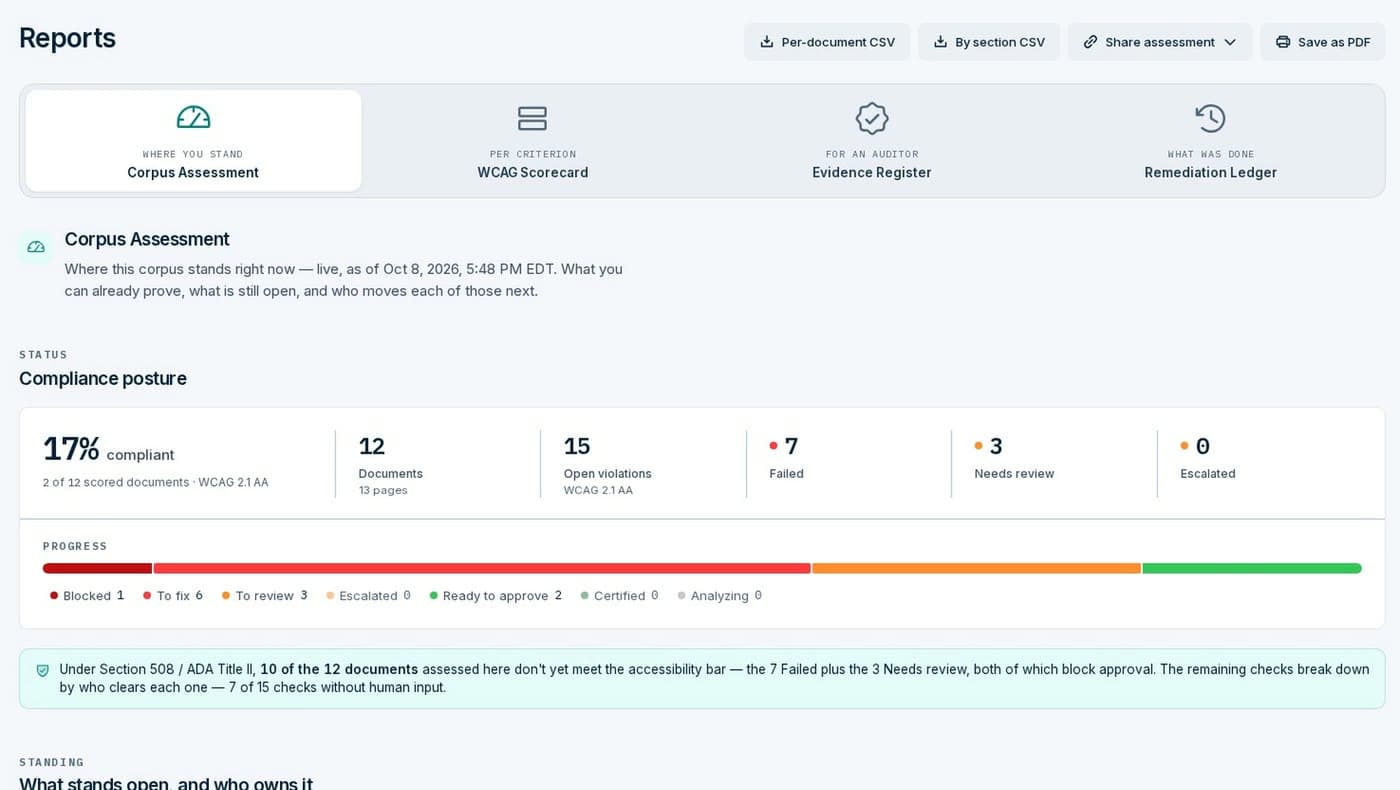
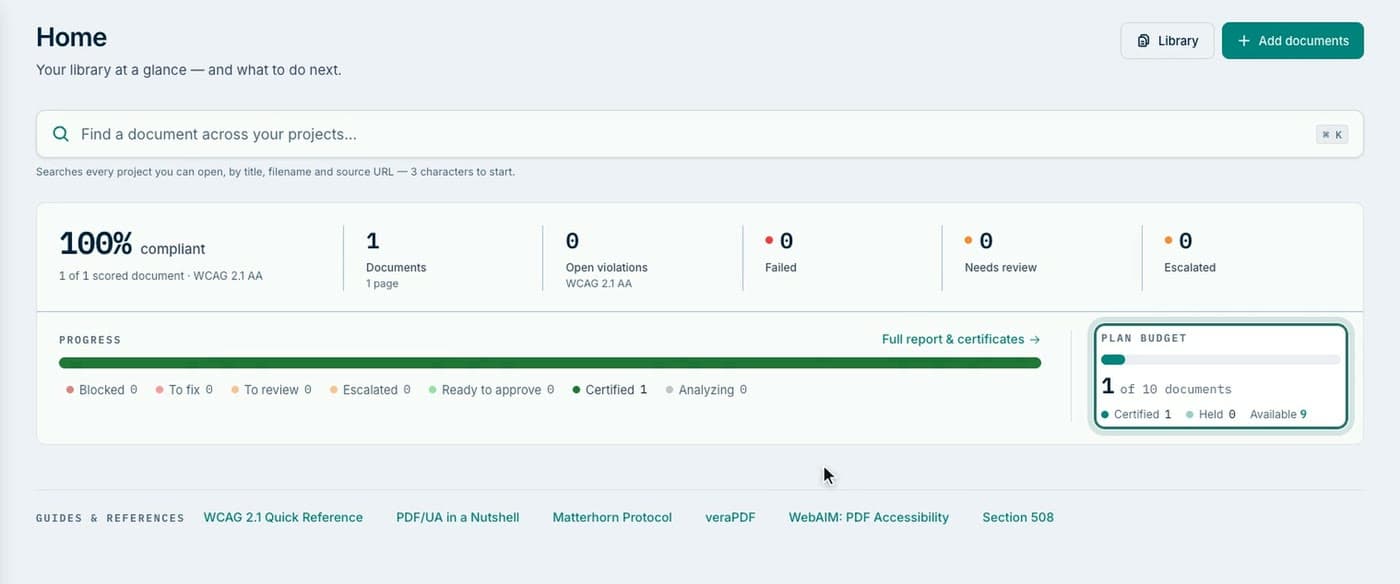
Every document is checked against WCAG 2.1 AA before anything changes.
- Proof
- Runs a rule profile built on veraPDF plus Ockem’s own detectors, with page-level evidence for each finding, and rolls it up by document and by site section.
- Your team
- Read where you stand and what it will take, before you spend anything.
- You end up with
- An assessment: the share that is compliant, what fails, and what needs a person.
03
Fix automatically
Software repairs the mechanical majority, across the whole library.
- Proof
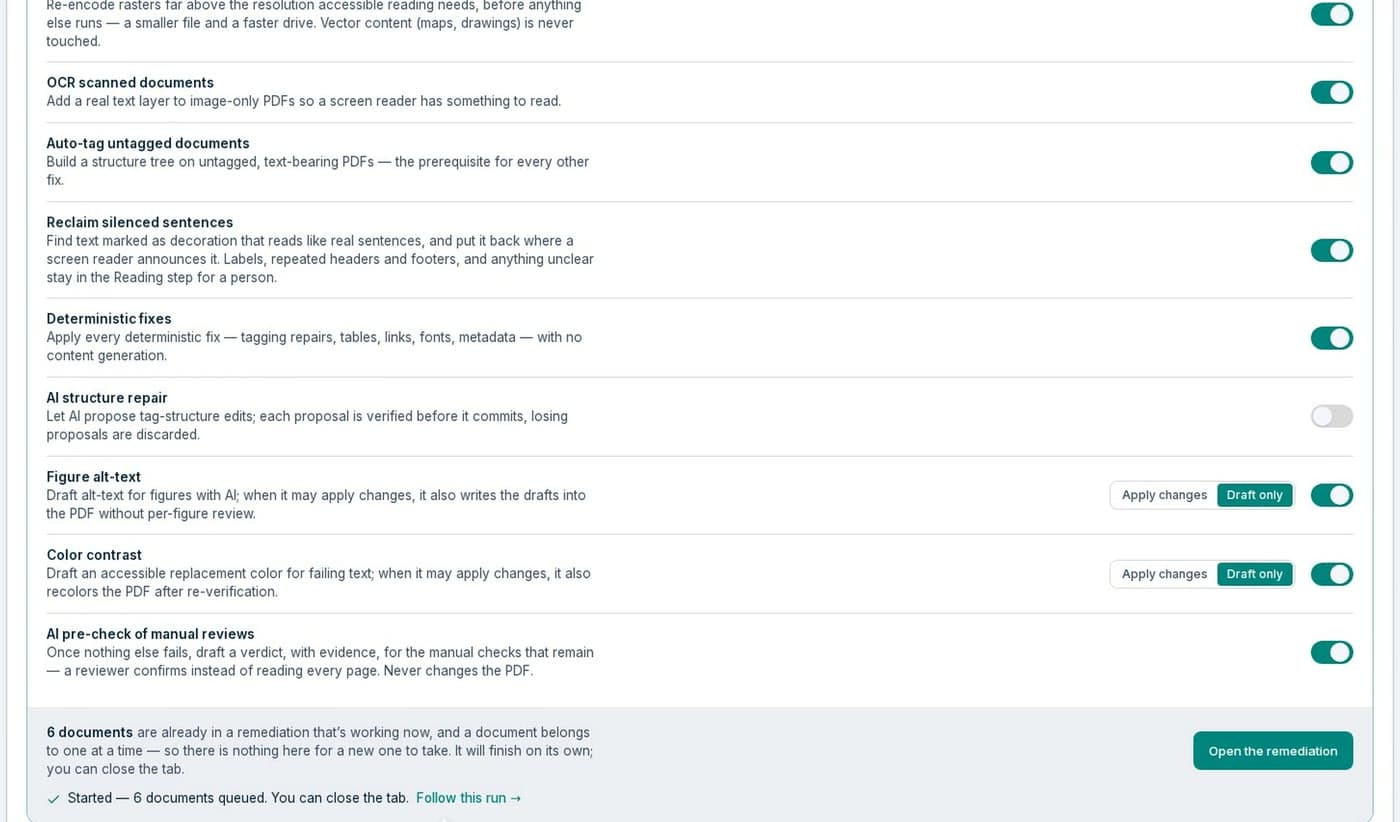
- 42 automated fixers rebuild tags, headings, lists, tables and scanned pages. Each fix is re-checked before it counts. Runs go folder by folder in the background.
- Your team
- Decide what Proof may do on its own, and what it should only draft for you.
- You end up with
- 63–74% of defects fixed automatically in the libraries we measured (Aug 2026).
04
Your team decides
What is left needs a person. Usually one or two calls per document.
- Proof
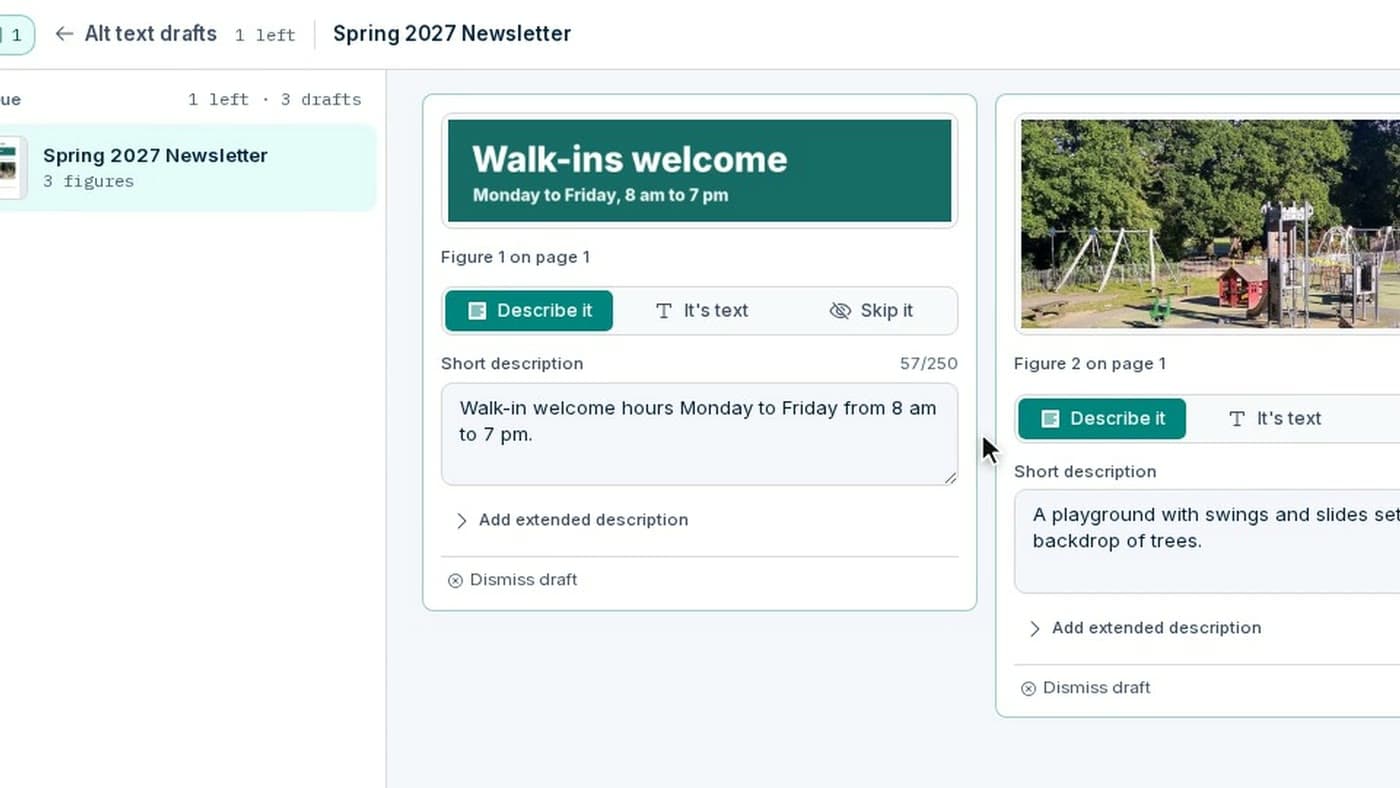
- Queues each call across the library, on the page, with the evidence beside it and an AI draft where one helps.
- Your team
- Make the calls: reading order, table headers, contrast, alt text. Each is recorded with who made it.
- You end up with
- Every judgment call answered and attributed.
05
Certify and deliver
A document is certified only when nothing is open.
- Proof
- Blocks certification while any check, machine or human, is unresolved; issues a one-page certificate with a public verification page; exports in bulk.
- Your team
- Approve, or have a second person approve, then publish the remediated files.
- You end up with
- For each document: the remediated PDF and a certificate anyone can verify.
06
Keep it current
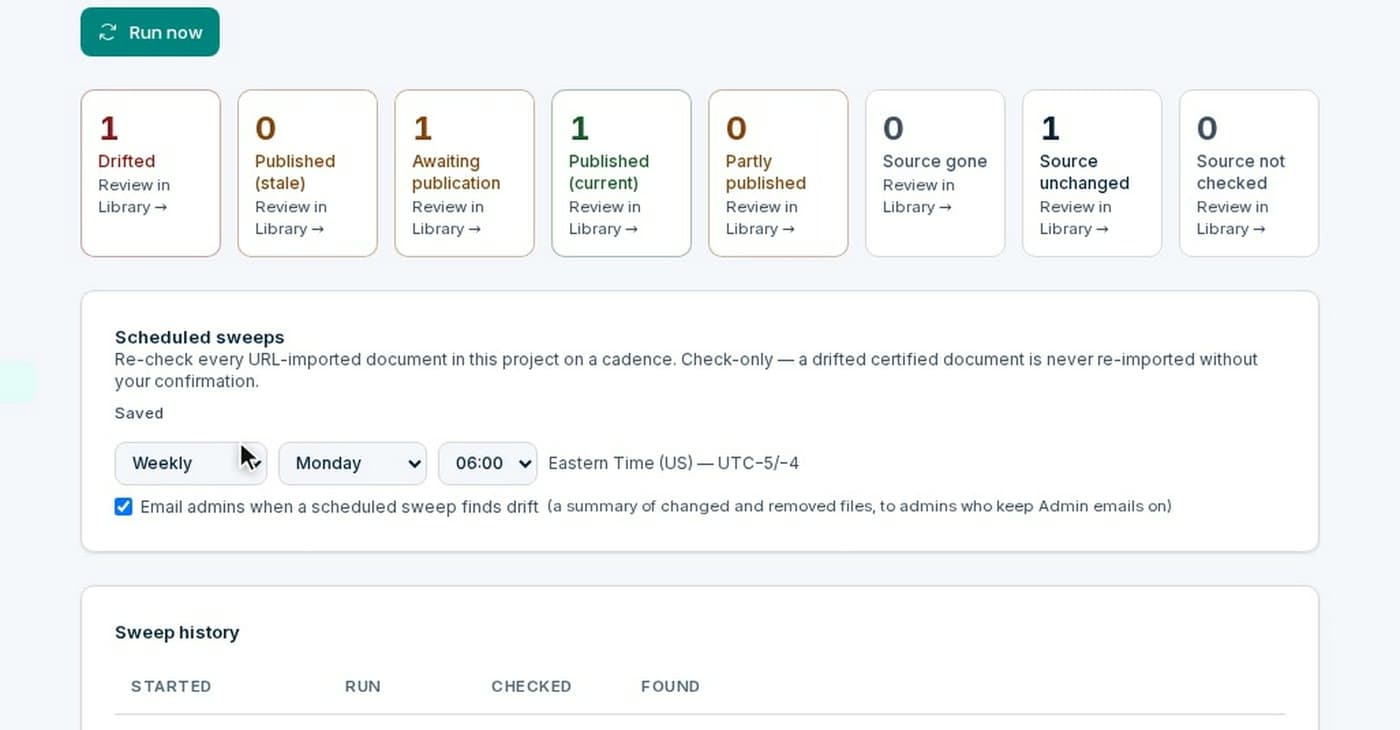
Websites change. Proof keeps checking what you published.
- Proof
- Re-checks every published address on the schedule you set, flags documents that changed or were never republished, and matches a new crawl against what you already hold.
- Your team
- Review what changed. The next run picks up only new or changed work.
- You end up with
- A program you can report on, not a project that is clean for one news cycle.
Watch
One document, start to finish.
The stages on one real PDF: upload it, let Proof fix it, answer its questions, and certify it. Recorded from the app, with captions.
The compliance claim
Every vendor claims compliance. Ours shows its work.
The certificate is evidence: it records every WCAG 2.1 AA check Proof ran on this exact file and every judgment call a person attested. It is not a usability test. For high-stakes documents — forms people must complete, notices people must act on — test the finished file with a screen reader as well; the certificate tells you which checks were made by a person.
What Proof never does
- §1
Every fix is checked again. A fix that does not survive the re-check is not counted, and a fix that would lose or hide any of the document’s text is refused.
- §2
Three verdicts, not two. Compliant, Needs review, Failed. A document is never called compliant while a check a person must make is open.
- §3
Nothing is certified with an open check. One unresolved check, machine or human, blocks the certificate.
- §4
N/A only when there is nothing to test. A check Proof could not run stays pending, and the certificate names any criterion that applies and was not evaluated.
- §5
Every version is kept. Each fix makes a new version and nothing is overwritten, so a certificate always names the exact file it covers.
Who does what
Four roles, one library.
- RemediatorsThe tool for each call, the review queue and bulk runs.Lessons for remediators
- Team leadsAssigning work, second-person approval and team progress.Lessons for team leads
- AdminsPeople and teams, automation policy, security and source integrity.Lessons for admins
- Compliance ownersThe scorecard, the evidence register and what certified means.Lessons for compliance owners
Inputs and outputs
What we accept. What you get back.
The short version a remediator or a procurement reviewer asks for first.
- PDF files only.
- Proof works on PDFs. Export Word, PowerPoint and Excel files to PDF first; anything in an import that isn’t a PDF is skipped.
- Size limits.
- The free trial takes one PDF of up to 10 pages and 50 MB. In a workspace, each PDF can be up to 1,000 pages and 200 MB, and a zip import takes up to 500 MB and 1,000 PDFs. Pricing counts one document per 50 pages.
- Documents in other languages.
- Alt text, figure descriptions and table summaries are drafted in the document’s own language: a Spanish document gets Spanish alt text. Scanned pages are read with OCR language packs for 37 languages, and 31 of them are recognized automatically when a document doesn’t declare its language. In right-to-left scripts such as Arabic, a person confirms the reading order.
- Your file, repaired.
- You get back the same PDF with its tags repaired and every fix re-checked. A fix that would lose or hide any of the document’s text is refused. Form fields stay fillable: each is tagged and labelled, and keeps its type, settings, position and appearance.
- Protected and signed files.
- A copy-protected PDF is unlocked so screen readers can read it. A PDF that needs a password to open can’t be processed: remove the password before you import it. A digitally signed PDF must be re-signed after remediation, because repairing the file invalidates its signature.
- What the certificate covers.
- Each certified document gets a one-page certificate against WCAG 2.1 AA. It records what was checked by machine and what your organization attested. Proof checks PDF/UA structure rules along the way, but it does not certify PDF/UA conformance.
What we do not accept. Proof is not offered for documents that contain protected health information (PHI) or FERPA-protected student education records, and Ockem does not yet sign Business Associate Agreements, so please do not upload them. Health information and student records
Security & trust
Ready for your security review.
Government and healthcare buyers ask where documents go and who can see them. Our answers are structural, not contractual.
Security and procurement: entity, subprocessors, retention, purchasing
- 01
Two-layer tenant isolation. Every query is org-scoped in the application and enforced by PostgreSQL Row-Level Security underneath.
- 02
Local-first AI, on hardware we operate. Inference runs on hardware we operate, with self-hosted open models. No customer document content goes to a third-party model. Documents in your workspace train our models only if you turn that on; public PDFs we collect ourselves to prepare an assessment may be used to improve our own models.
- 03
Separate storage, expiring links. Every file is stored under your organization’s own prefix, and download links expire. The free inventory keeps only metadata about each file. A free assessment scores a sample of your documents — 12 by default, up to 100 for requests we qualify. The sample is deleted 30 days after it is taken; a full import prepared for an assessment is deleted 90 days after its last activity.
- 04
Audit logging, backups, SSO, MFA. A structured audit trail, nightly backups, optional two-factor sign-in with an authenticator app, and a self-service admin console for people, teams, and security policy. Google single sign-on or your own identity provider (OIDC), with roles scoped to your organization, is available on team plans.
Your documents and our models. Ockem does not use your documents to train its models unless you turn that on in workspace settings — it is off by default. When it is on, we use the document’s structure, page renders, the changes each fix made, and your team’s review decisions, to improve our own accessibility models only. We never sell your documents, never share them with other customers, and never hand them to a third party to train theirs. A free evaluation is the one exception: there, training use is the condition an administrator accepts before the workspace opens. Public documents we collect ourselves, such as the PDFs we crawl from a public website to prepare an assessment, may be used to improve our own models; they are never sold or shared with another customer. Documents you upload follow your workspace setting.
Separately, we keep records of how our own checks and fixes performed on your documents. Those records include short excerpts — the line a check flagged, a heading, a title — but never a complete copy. When they are not enough to explain a failure, an Ockem engineer may open the document to diagnose it; that access is limited to the people who need it and is never used to build a training dataset. Privacy Policy
Start with the whole picture.
Count the PDFs on your site and see how they score, free. Or try one PDF now.